
By Jack Pan — Founder of Cartosketch, developer, designer, and map enthusiast
مراكش · Marrakech: Generating a Travel Poster with an Arabic Title
Day 3 of the Destination Poster series. Why most AI image generators butcher Arabic text — and how Cartosketch composes a Marrakech poster with مراكش set as the headline.
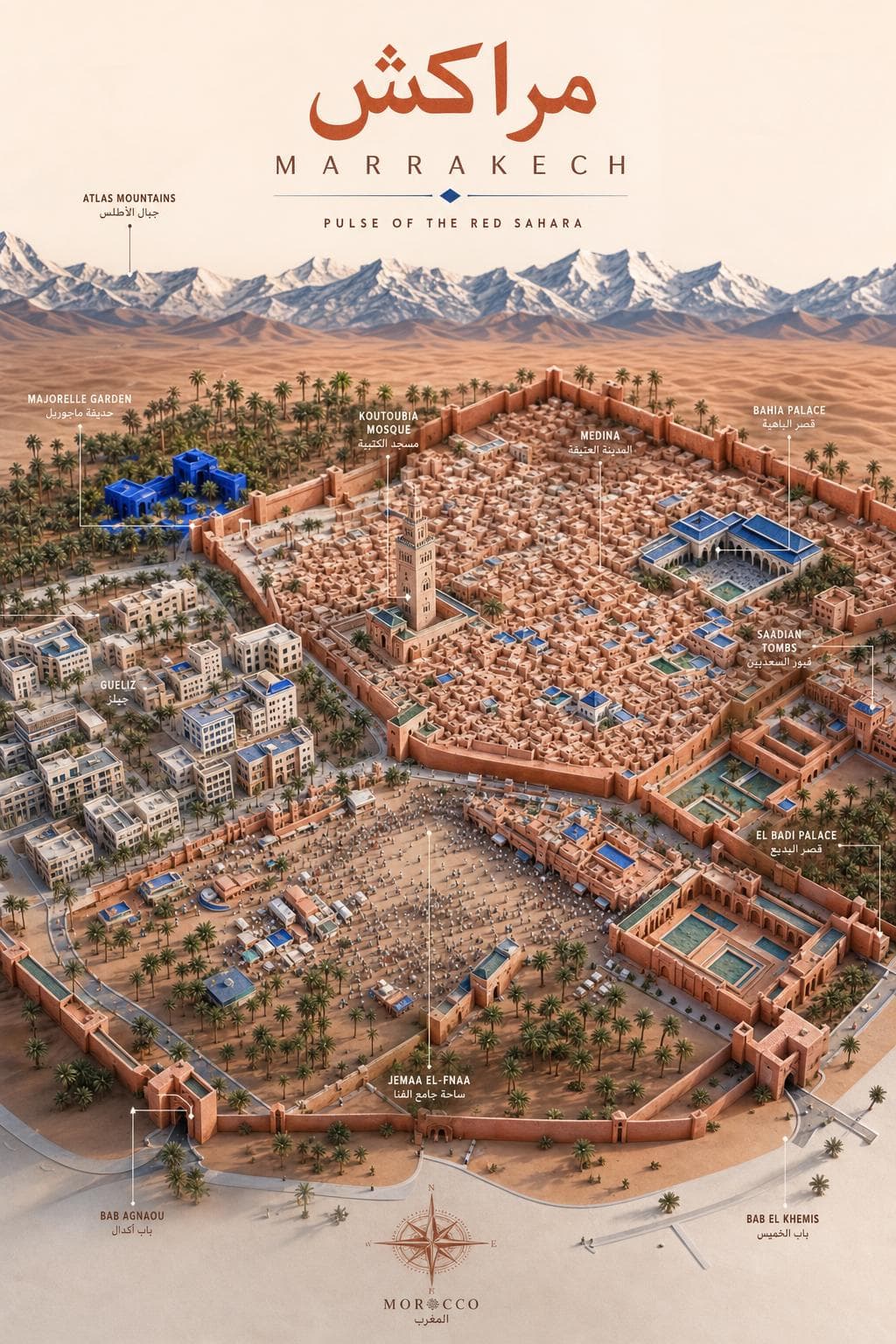
Type "Marrakech" into most AI image generators and the Arabic on the resulting poster will look like a hand of broken glyphs — the letterforms don't connect, diacritics drift, and the right-to-left order falls apart. One reason we built the Destination Poster product line was to do this right. Here's مراكش, rendered as a headline.
Why Arabic breaks on AI image output
Image models are trained to draw glyph shapes, not to typeset. For Latin alphabets that's mostly fine — letters are spaced, the shapes are stable, errors look like quirky kerning. For Arabic it falls apart: letters change shape based on position in the word (initial / medial / final / isolated), they must connect into ligatures, and the line reads right-to-left. A model that hasn't been guided will draw the right-looking glyphs in the wrong order, or break the connections, or mirror the whole headline.
Our poster prompt fixes this in three ways. First, it explicitly names the script ("Arabic") and the direction ("RTL, contextual letterforms must connect"). Second, it pins the headline as the top focal element so the model treats it as type, not texture. Third, it includes a Latin transliteration line so layout-aware models can use the Latin baseline to align the Arabic above it.
Composing Marrakech
The Marrakech poster is portrait by default because the Atlas mountains are part of the story. The composition runs: snow-capped Atlas on the horizon (with جبال الأطلس labelled in Arabic and Latin), Majorelle Garden's distinctive blue in the upper-left, the Medina walls enclosing the souqs, Koutoubia Mosque rising from the center, Bahia Palace and the Saadian Tombs flanking, Jemaa el-Fnaa pulsing at the bottom — with Bab Agnaou and Bab el Khemis named as gates on the lower edge.
Make a poster in your own script
- Type the place name in the script you want on the poster — Arabic, Chinese (简体 / 繁體), Japanese, Korean, Cyrillic, Hebrew, Thai, Greek, or Latin.
- Cartosketch matches the title to the script you typed and adds a Latin transliteration as a secondary line.
- If the script renders awkwardly, send a one-line refinement — "fix the diacritic on the second letter".
- Export at 1024×1536 for portrait wall art; 2048×2048 if you want square framing or social-share crops.
FAQ
- Will the Arabic always be correct?
- It's a vast improvement over generic image models, but it's still AI text — proofread before you print. The single-letter-fix refinement loop exists precisely for this.
- Can I use Berber (Tifinagh) script for Moroccan place names?
- Type the place name in Tifinagh and the model will follow the script. Coverage is best for the dominant scripts (Latin, CJK, Arabic, Cyrillic); less common scripts may need an extra refinement pass.
- Does this work for full sentences, or only headlines?
- Best results are short — headline + tagline. Long paragraphs of generated text are still unreliable on image models. For body copy, add it in your layout tool after export.
Founder of Cartosketch — developer, designer, and map enthusiast.