
By Jack Pan — Founder of Cartosketch, developer, designer, and map enthusiast
Kyoto in Japanese, on a Poster: How Cartosketch Composes 京都 · Kyoto
Day 1 of the Destination Poster series. How Cartosketch turned 京都 into an isometric relief-map travel poster with a native-script title — and what locals' feedback told us about the result.
京都 · Kyoto · 千年の静寂の美. That third line — A Thousand Years of Quiet Beauty — is the tagline Cartosketch wrote for Kyoto when we asked it to compose a destination poster from a single Japanese place name. This is what came back, and what we learned from putting it in front of Kyoto locals on Reddit.
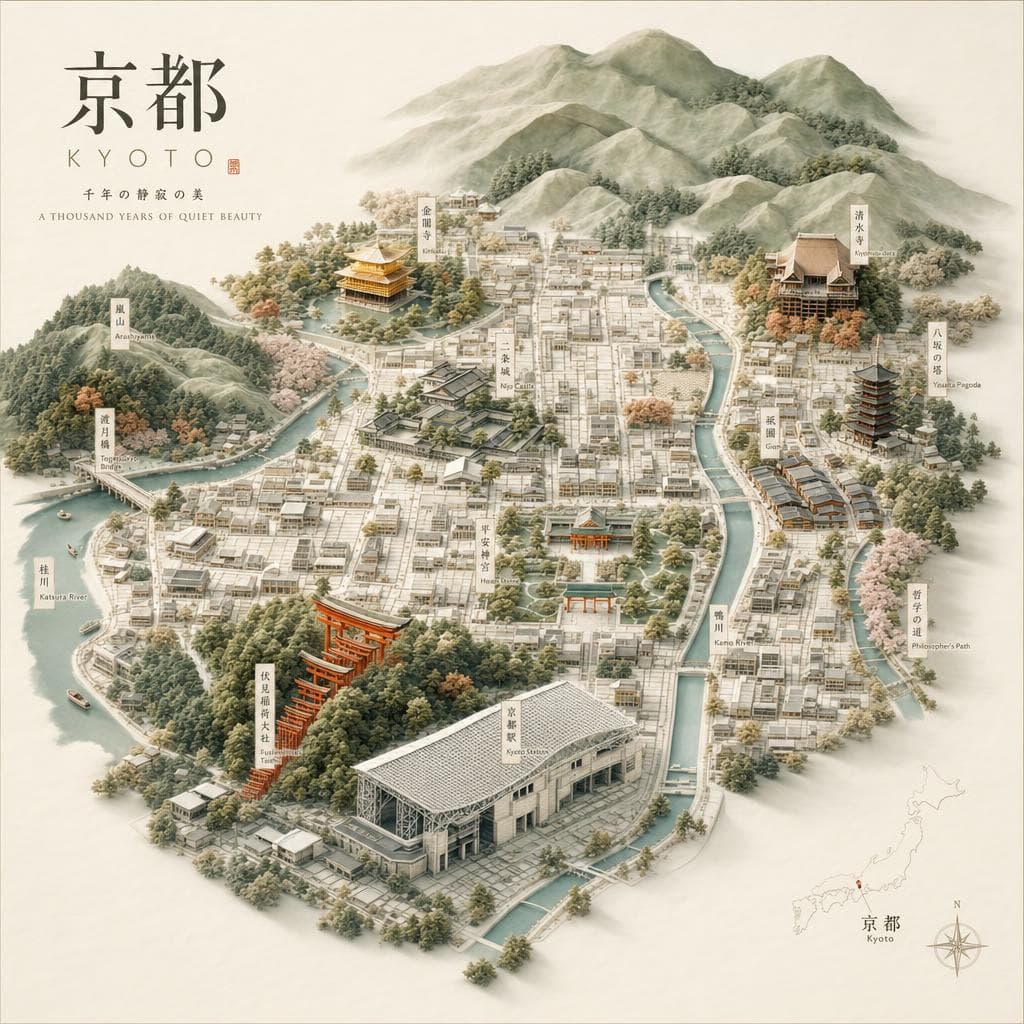
What's in the frame
An isometric relief-map view runs from the western mountains down through the city core: Arashiyama and the Togetsukyo Bridge on the left, Kinkaku-ji's gold pavilion glowing on a forested rise above the Kamo and Katsura river system, the temple grid of central Kyoto, and Kyoto Station's lattice roof anchoring the south. Heian Shrine sits mid-frame, Yasaka Pagoda and Kiyomizu-dera step up the eastern hills, and Fushimi Inari's vermilion torii thread down toward the bottom-right corner.
The label set is intentional, not random: Cartosketch's poster prompt asks the model to surface the landmarks a first-time visitor would recognize, lay them out so the geography still reads, and add small terrain cues (cypress and cherry trees, ridge shading) that say "Kyoto" before you read a single label.
Why the title is in Japanese
Most AI image generators garble non-Latin scripts. Cartosketch handles them as first-class output: when you type 京都, the model is instructed to set the headline in Japanese, with a Latin transliteration below it, and a one-line Japanese tagline beneath that. Type "Kyoto" in English instead and you get the Latin headline with a Japanese subtitle — same picture, swapped emphasis.
This matters for travel posters specifically, because the language on the poster is part of the souvenir. A Kyoto poster that says only KYOTO in Helvetica feels like a stock asset. 京都 · Kyoto · 千年の静寂の美 reads like something printed in Kyoto.
Make your own — five-minute version
- Open /dash/posters/new (free credit on signup, no card needed).
- Type the place name in whichever language you want on the poster (京都, Kyoto, キョウト — all work).
- Pick a size — 1024×1024 for square framing, 1024×1536 for portrait wall art.
- Click Generate (1 credit, ~60 seconds).
- Don't like a detail? Send a one-line text refinement in the side chat ("add Gion", "make Fushimi Inari larger") — 1 credit per refinement.
FAQ
- Can I use the Kyoto poster commercially — say, on a print I sell?
- Yes. Paid-plan outputs are released under commercial-use terms and downloads are watermark-free. The Plus plan ($10/mo) covers most casual creators; Pro ($20/mo) suits print-on-demand sellers.
- Does the same prompt work for other Japanese cities (Osaka, Kanazawa, Naha)?
- Yes. The Destination Poster pipeline is place-agnostic — type any city, region, national park, or landmark in any script and the model picks the right local landmarks and the right script for the title.
- What if the model misses an obvious landmark?
- Open the poster in the studio and send a refinement: "add Heian Shrine in the mid-foreground". The image model edits the existing poster in place; you don't have to regenerate the whole thing.
Founder of Cartosketch — developer, designer, and map enthusiast.