
By Jack Pan — Founder of CartoSketch, developer, designer, and map enthusiast
How to Make a Hand-Drawn Cartoon Map of Tokyo Disney Resort with CartoSketch
A step-by-step tutorial for turning Tokyo Disney Resort into a hand-drawn cartoon map using CartoSketch — frame, generate, refine with Modify, then drop in titles with the canvas editor. The whole workflow takes about five minutes, costs a couple of dollars, and needs zero illustration skill.
Tokyo Disney Resort has one of the most beloved illustrated park maps in the world — that bird's-eye watercolor of Tokyo Disneyland and Tokyo DisneySea, with Cinderella Castle, Mount Prometheus, and the Maihama monorail laid out like a storybook. This tutorial shows the exact CartoSketch workflow we used to recreate it as a hand-drawn cartoon map: a single generate pass, one targeted Modify pass to clean up the edges, and the canvas editor to drop the title in. Total time, end to end: about five minutes.
Why a cartoon map of Tokyo Disney is such a fun project
The official Tokyo Disney Resort guide map is iconic: a slightly tilted, painterly aerial that turns the entire resort into one continuous illustration. The volcano of Mount Prometheus erupts on the left, Cinderella Castle anchors Tokyo Disneyland on the right, the Tokyo Bay coastline curls along the top, and the JR Maihama train line and Resort Gateway Station frame the bottom. It feels like something out of a vintage travel poster.
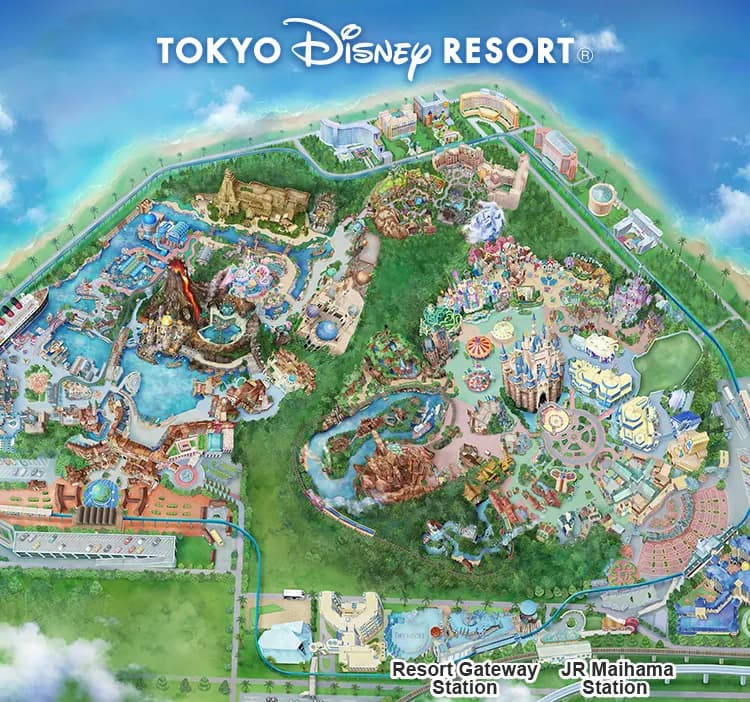
Because the layout is real geography, you can recreate that same composition from a satellite tile and let an AI re-illustrate it. CartoSketch is built exactly for this: it pulls the actual Mapbox view of Maihama, sends it to a Gemini image model with a cartoon-style system prompt, and returns a redrawn version with the parks, the lagoon, and the rail line all in the right places — only now styled as a hand-drawn cartoon.
Step-by-step: turning Tokyo Disney Resort into a hand-drawn cartoon
Step 1 — Search for Tokyo Disney Resort
Open your CartoSketch dashboard and click "New Map". In the Google Places search bar, type "Tokyo Disney Resort" (or "Tokyo Disneyland" if you only want the castle park). The map flies straight to Maihama, Urayasu — both parks, the hotels along the gateway, and the train line are all visible in a single view.
Step 2 — Frame both parks (zoom 14.8 / bearing 223° / pitch 40°)
Switch the map type to "Satellite" — for theme parks the satellite tile gives the AI much more detail to work with than the streets layer. Then dial in these three numbers in the map-select panel; they are the exact values we used for the cartoon at the bottom of this article:
- Zoom: 14.8 — tight enough that both parks fill the canvas, but with a sliver of Tokyo Bay along one edge for context.
- Bearing: 223° — rotates DisneySea into the upper-left and Disneyland into the lower-right, mirroring the angle of the official guide map.
- Pitch: 40° — gives the bird's-eye tilt that makes the buildings read as illustrated landmarks instead of flat satellite shapes.
Step 3 — Pick the Cartoon style and write a prompt
In the Style panel, pick "Cartoon". This is the style that produces the bold outlines, simplified building blocks, and flat painterly fills that read as "guidebook map" rather than "photograph". You can leave the prompt blank for a clean default, but a short hint pushes the result much closer to the official Tokyo Disney aesthetic.
Step 4 — Generate the first pass (~60 seconds, 1 credit)
Click Generate. CartoSketch fetches the Mapbox satellite tile of Maihama at our framing, ships it to Gemini with the Cartoon system prompt, writes the lossless PNG to the origin bucket, and returns a JPEG variant for the editor — all in about a minute. The first pass is good, but it is not finished. Look at the result honestly:
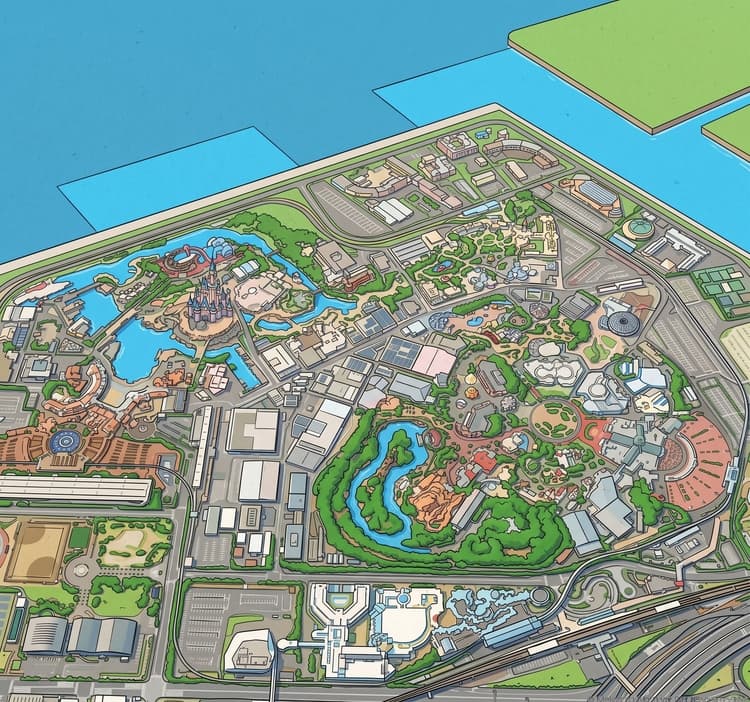
Two things are wrong: the model painted the bottom-left parking block as if it were inside the park (it should be empty land), and the water along the top of the frame has stray little blocks the model invented. This is normal — the model has no idea where the park boundary is, only what the satellite tile looked like. We fix both in one Modify pass.
Step 5 — Refine with one targeted Modify pass (~60 seconds, 1 credit)
Open the map-sketch editor and use the Modify tool. The trick is to write a prompt that is specific about both the location of the issue and the fix you want. The exact prompt we used:
Modify re-loads the lossless PNG from the origin bucket, sends the same image plus this text to Gemini, and writes a new version. One credit. Another minute. The result:
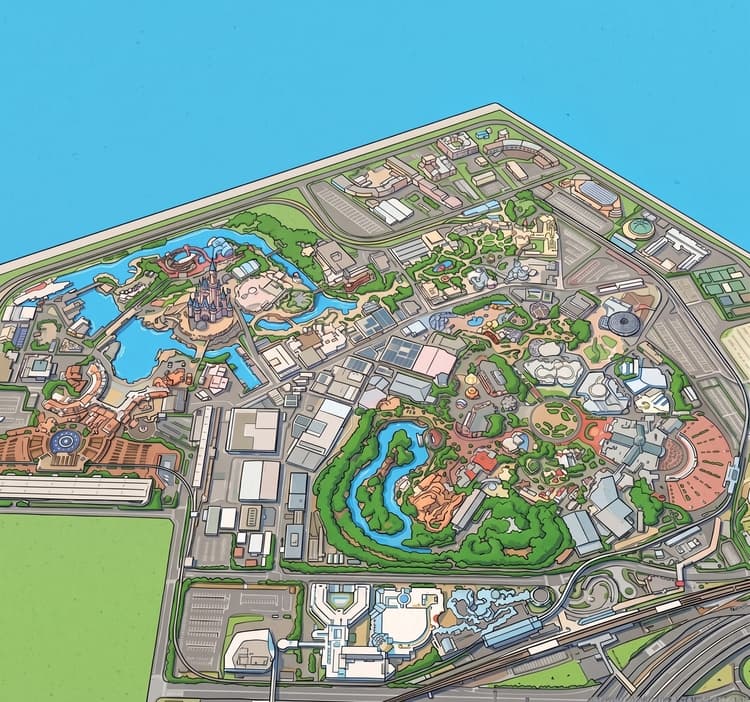
If something else still bothers you, run another Modify pass for one more credit, or use Inpainting to mask just one region and rewrite that area without touching the rest. We stopped after one pass because the geography read correctly.
Step 6 — Add the title with the canvas editor (free, ~1 minute)
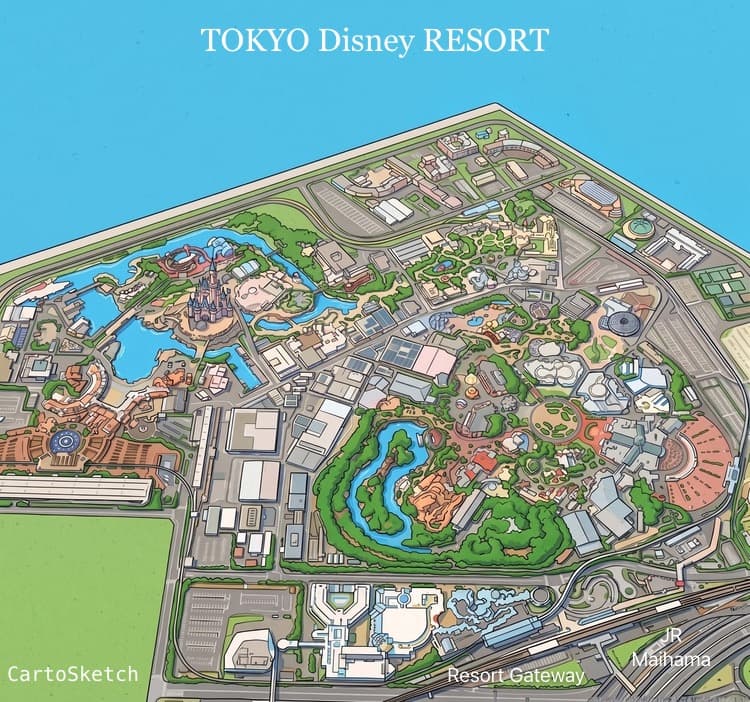
The official Disney guide map has the words "TOKYO Disney RESORT" floating across the top, plus station labels at the bottom. Resist the urge to make the AI render that text — image models are notoriously inconsistent with typography, and the spelling tends to drift. Instead, switch over to the map-canvas editor, which lets you overlay text and shapes on top of the generated image without spending another credit.
- Drop in a heading text layer with "TOKYO Disney RESORT" across the top.
- Add small label texts for "Resort Gateway Station" and "JR Maihama" along the bottom edge.
- "CartoSketch" goes in the bottom-left as a watermark, where the parking lawn now sits.
- Pick a clean serif/script font, set the colour to off-white so it sits cleanly on both sea and sky.
Canvas overlays are not a generation step — they cost zero credits, render instantly, and stay editable. Move them around, restyle them, or strip them out before exporting if you want a clean unlabelled version too.
Why this workflow is so much faster (and cheaper) than illustrating one by hand
The honest pitch for CartoSketch is not that it replaces a custom illustrator — it is that it makes a category of work feasible that previously was not. A hand-painted theme-park map is a multi-week project that costs four figures and needs a working illustrator, a cartographic reference, and a graphic designer for the typography. Almost no individual creator has that budget. The five-minute, two-credit workflow above produces something legitimately good enough for a blog post header, a fan zine, a trip-planning guide, or a personal print — at a price point where it is cheaper than a coffee.
- Time: ~5 minutes total (1 minute frame, 1 minute generate, 1 minute refine, 2 minutes label).
- Cost: 2 generation credits — free if you have just signed up and bought one Credit Pack ($5), or part of any Plus/Pro monthly allowance.
- Skill required: zero illustration or cartography experience. If you can drag a map and type a sentence, you can do this.
- Iteration: free reframing, free relabelling, and only one credit per refinement pass. Bad first pass? Fix it for $1.67.
- Output: 2K PNG, no watermark, ready to print or drop into a layout.
CartoSketch cartoon vs the official Tokyo Disney guide map
The official Disney map is a custom-painted illustration created by professional artists over weeks. A CartoSketch cartoon is generated, refined, and labelled in five minutes. They are different artifacts — but they share a surprising amount of DNA, because both start from the same real-world footprint.
| Dimension | Official Tokyo Disney guide map | CartoSketch cartoon map |
|---|---|---|
| Geography | Hand-painted from architectural references | Real Mapbox satellite tile of Maihama, redrawn |
| Time to produce | Weeks of custom illustration | About 5 minutes (generate + refine + label) |
| People involved | Illustrator, cartographer, typographer, art director | One person, no specialist skills required |
| Personalization | Fixed — one canonical version | Reframe, restyle, or re-prompt freely |
| Resolution | Print-grade illustration | Up to 2K PNG (Pro / Credit Pack); 1K on Plus |
| Cost | Four figures plus, bundled with park collateral | Two credits — free signup + $5 Credit Pack covers it |
| Commercial use | Owned by The Walt Disney Company | Allowed on every paid CartoSketch plan, with the usual trademark caveats around the Disney name |
Tips for theme park maps in general
- Always pick the satellite map type for parks. Streets data leaves out rides, paths, and water features that make a park readable.
- Square or near-square framing wins for resorts with twin parks (Tokyo Disney, Disneyland Paris, Universal Orlando). Landscape framing suits long, linear parks like Cedar Point.
- Lean into the prompt. Words like "guidebook", "storybook", "hand-drawn", and "soft watercolor fills" pull the model toward the illustrated-map aesthetic.
- Generate first, label later. CartoSketch can render station and park names directly, but adding crisp typography in Figma or Affinity Designer after download usually looks cleaner.
- Save the PNG original. The lossless PNG in the origin bucket is what Modify and Inpainting re-load; keep it if you plan to iterate weeks later.
Other Disney parks worth trying
Once you have the workflow down for Tokyo Disney, the same recipe works on every Disney resort on the planet. Each park has its own personality, and the cartoon style highlights different details depending on the layout.
| Resort | Search term | Why it looks good in cartoon style |
|---|---|---|
| Walt Disney World | Walt Disney World Resort, Orlando | Four parks plus lakes — best at zoom 11 for a sweeping resort overview. |
| Disneyland Paris | Disneyland Paris, Marne-la-Vallée | Twin-park layout like Tokyo; Sleeping Beauty Castle is unmistakable from the air. |
| Hong Kong Disneyland | Hong Kong Disneyland, Lantau Island | Compact, surrounded by water — a single tight square reads beautifully. |
| Shanghai Disneyland | Shanghai Disneyland, Pudong | The largest Disney castle and the Wishing Star Lake create dramatic blue negative space. |
| Disneyland Resort Anaheim | Disneyland Park, Anaheim | Original park plus DCA — slight bearing helps Main Street and the castle line up. |
Use cases for a hand-drawn Tokyo Disney map
- Trip planning: print a personalized cartoon overview before a family visit and mark the must-do attractions.
- Travel content: bloggers and YouTubers can use a custom cartoon header instead of a stock satellite screenshot.
- Memories and gifts: a framed cartoon map of the resort dated with your trip month makes a great keepsake.
- Fan art and zines: editorial-style illustrations for personal Disney fan projects.
- Presentations: theme park researchers, urban planners, and tourism analysts get an illustration they can drop into slides without licensing stock art.
Frequently asked questions
- Can CartoSketch really tell which buildings are which inside Tokyo Disney?
- It does not have a database of named attractions, but it does see the satellite tile, which already shows Cinderella Castle, Mount Prometheus, the central lagoons, the parking structures, and the rail loop. The cartoon style preserves those shapes faithfully, so a fan recognizes the parks instantly even though no individual ride is labelled.
- Should I use streets or satellite for theme parks?
- Satellite, almost always. Theme parks are not described well by road network data — most of what makes a park readable (rides, water features, themed lands) shows up only on satellite imagery.
- Why does my first generation look more abstract than the official map?
- Two common fixes. First, increase zoom so the parks fill more of the canvas. Second, strengthen the prompt with explicit guidebook-illustration vocabulary: "hand-drawn", "ink outlines", "soft watercolor", "illustrated theme park map". You can also run the result through Modify with the same words to push it further in that direction.
- Can I add labels like the official map has?
- Yes, and you do not need an external vector tool — CartoSketch ships with a canvas editor (map-canvas) that lets you overlay text and shapes on top of the generated image. Canvas overlays do not consume credits and stay editable, so you can move the title around or strip it out for a clean export. We strongly recommend this over asking the model to render text, because image models are inconsistent with typography.
- Should I expect to get the perfect image on the first generation?
- Almost never, and that is fine. Plan for at least one Modify pass to clean up regions the model misinterpreted (for theme parks, the most common issues are stray buildings in water and parking lots being drawn as if they were inside the park). One refinement pass is one credit and about a minute, and it is much faster than re-framing and regenerating from scratch. Expect ~5 minutes of total work for a presentation-ready result.
- Is the resolution high enough for a poster?
- Yes. The 2K (2048×2048) output from the Credit Pack and Pro plans prints cleanly at A2 poster size or 18×18" framed. The Plus plan outputs 1K, which is plenty for blog headers and screen use but a bit tight for large prints.
- Can I sell prints of my Tokyo Disney cartoon map?
- CartoSketch's commercial license allows you to use generated images commercially, but the Disney brand is separately protected. You can use the map for personal art, editorial commentary, or fan projects, but you should not sell merchandise that uses the Disney name or recognizable trademarks without licensing them from The Walt Disney Company.
Founder of CartoSketch — developer, designer, and map enthusiast.